Three timer faces
A ring, a bar, or just the numbers. Click the time to type your own length, or pick a preset like 25 / 5 or 45 / 15 in Settings. Click the little icon above it to pick your own.
A calm focus timer that lives in your Mac's menu bar. It shows where your focus went, and it keeps that to itself.
Free · 3.8 MB · macOS 15 or later · Apple Silicon and Intel · No account
FOCUS ICON
Finish thesis outline
Design review in 48m
Press Start. The demo runs 60 times faster than real life, so a session takes 25 seconds.
Features
A ring, a bar, or just the numbers. Click the time to type your own length, or pick a preset like 25 / 5 or 45 / 15 in Settings. Click the little icon above it to pick your own.
Pick the task you're focusing on. Finished ones slide out of the way.
Hit your daily goal to keep it going. Each week earns a freeze for a missed day.
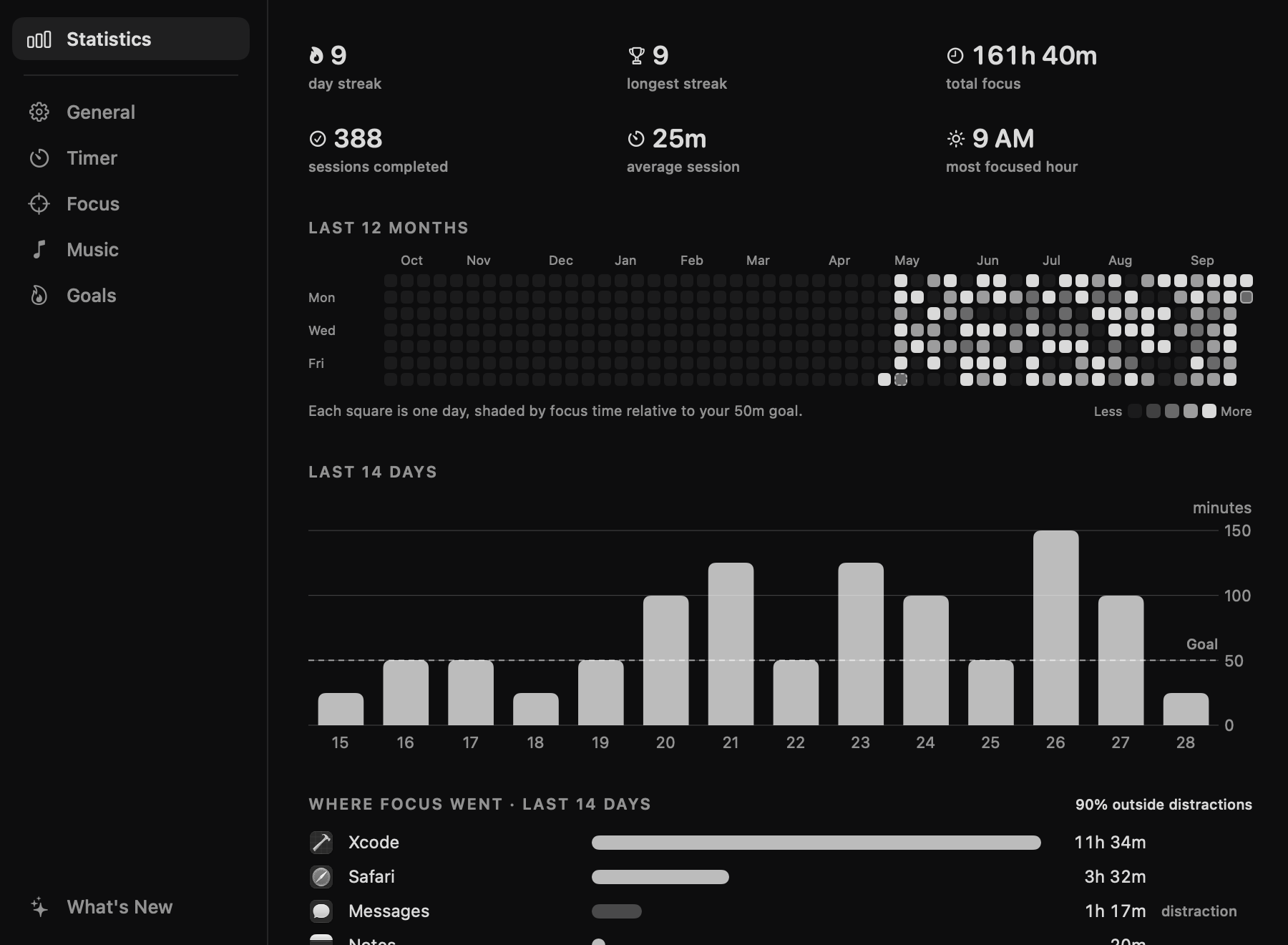
A heatmap of every day you focused, plus totals, a two-week chart and your most focused hour.
Rain and soft noise, made on your Mac as you listen. Or your own music app's playlist. It plays when focus starts and pauses on breaks.
No Dock icon and no window to manage. A small arc in the menu bar shows the time left at a glance.
Focus Guard · New
Hourlet notes which app is in front during each focus session and gives it a focus score. Mark the apps that pull you away, and it can nudge you back or hide them. It all happens on your Mac, with no cloud and no one watching.
Mark apps and websites as distracting. Track quietly, get a gentle nudge after a grace period, or have the app hidden for you.
Calendar and Do Not Disturb · New
Hourlet reads your next event and ends a session a couple of minutes before it, so focus never runs into a meeting. While you focus, it can turn on Do Not Disturb for you.
A 25-minute session that would run into Design review becomes a 22-minute one.
Two clicks add Hourlet's shortcuts to the Shortcuts app. Then Do Not Disturb comes on when a session starts and goes off when it ends.
How it compares
| Feature | Hourlet | Cloud time trackers | Basic menu bar timers |
|---|---|---|---|
| Price | Free | Monthly subscription | Free or paid |
| Account needed | No | Yes | No |
| Your data leaves your Mac | Never | Uploaded | Varies |
| Where your focus went | Per app, on device | In the cloud | No |
| Distraction nudges | Yes | Yes | No |
| Tasks, streaks and heatmap | Built in | Projects | Rarely |
| Plans around your calendar | Yes | Yes | No |
| Focus sounds | Built in | No | Rarely |
Privacy
0 focus sessions logged on this imaginary Mac, and not one byte of them sent anywhere.
Read the privacy policy. It's short, because there's little to say.

Install
Hourlet is free and made by one person, so it isn't notarized by Apple (that needs a paid developer account). macOS asks you to confirm it once, the first time you open it.
Download Hourlet.dmg (3.8 MB), open it, and drag Hourlet into Applications.
Open Hourlet. When macOS says “Hourlet” Not Opened, click Done, then go to System Settings → Privacy & Security, scroll down and click Open Anyway. You only do this once.
Turn on Settings → General → Open Hourlet at login, and it's always one click away.
shasum -a 256 Hourlet.dmg in Terminal and compare it with:
aea0643a6dbf7a473600efd54be66694384646729da0631ae45ed7855052457d
This command downloads the same disk image over HTTPS, checks its checksum and signature, and copies Hourlet into Applications. Files downloaded this way aren't quarantined, so it also skips macOS's one-time confirmation. Installing means you agree to the license.
curl --proto '=https' --tlsv1.2 -fsSL https://hourlet.pages.dev/install.sh | bash
Read the script before running it.
Yes. There are no ads, subscriptions or in-app purchases, and no account to create.
No. It notes the name of the app in front during a focus session, which macOS shares with every app. It never reads window titles, screen contents or keystrokes, and nothing is sent anywhere.
If you add distracting websites, Hourlet asks your browser which site its front tab is on during focus sessions (macOS asks your permission first). It compares only the site name with your list and never saves addresses or browsing history.
You can set Focus Guard to Off in Settings → Focus.
Hourlet keeps a backup of your tasks, focus history, streaks and settings every day and before each update, and restores a damaged file from it automatically. You can also export everything to a file in Settings → Goals and import it on any Mac.
macOS doesn't let apps switch Focus directly, so Hourlet runs two shortcuts: one that turns Do Not Disturb on, one that turns it off. In Settings → Focus, click Add Do Not Disturb Shortcuts, then Add Shortcut on each one in the Shortcuts app, and Hourlet picks them up. You can also use shortcuts of your own for any Focus. If something isn't set up, the popover tells you. Hourlet only ever turns off a Focus it turned on.
Only if you turn on "Plan around my calendar". Hourlet reads your upcoming events' title, time and status, to end sessions before the next one and show it under the timer. It never changes, copies or stores your events. All-day, declined and "free" events are ignored.
Apple only removes that warning for apps notarized through its paid developer program. Hourlet is signed with the hardened runtime but not notarized, so a copy downloaded in your browser has to be confirmed once in Privacy & Security.
Hourlet is free and made by one person, and the program costs $99 a year, so it isn't notarized. The app makes no network requests except its daily update check, and it collects nothing.
If you'd like to be sure the file hasn't been changed, compare its checksum with the one in the install steps.
Only if you choose Apple Music or Spotify as your sound. Hourlet uses that permission to play and pause your playlist when a session starts or a break begins. It doesn't read your library or listening history.
In ~/Library/Application Support/Hourlet on your Mac. To uninstall, quit Hourlet from its menu, move it from Applications to the Trash, and delete that folder.
A Mac with macOS 15 or later. It runs natively on both Apple Silicon and Intel.
Free · macOS 15 or later · Apple Silicon and Intel